PLAS Util · PC optimizer Engineered for every PC.
PC tweaks and BIOS tuning for gaming: higher FPS, less stutter, lower input delay. One polished app instead of twenty sketchy scripts.
PLAS Util is a Windows app. Open the link on your PC to download it.
Free to start · Sign in with Discord · Self-updating · Windows 10 & 11
- 100+
- reversible tweaks
- BIOS
- read and verified
- 11
- languages
- 1-click
- NVIDIA driver reinstall
Everything in one window.
No script packs or registry files from strangers, and no reboot to see if it worked.
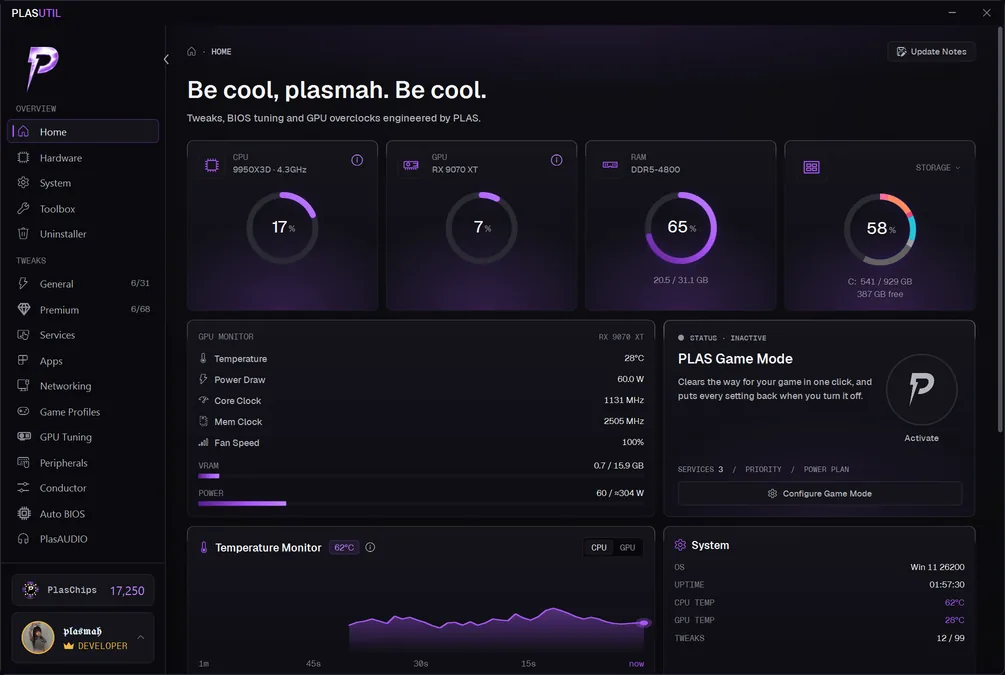
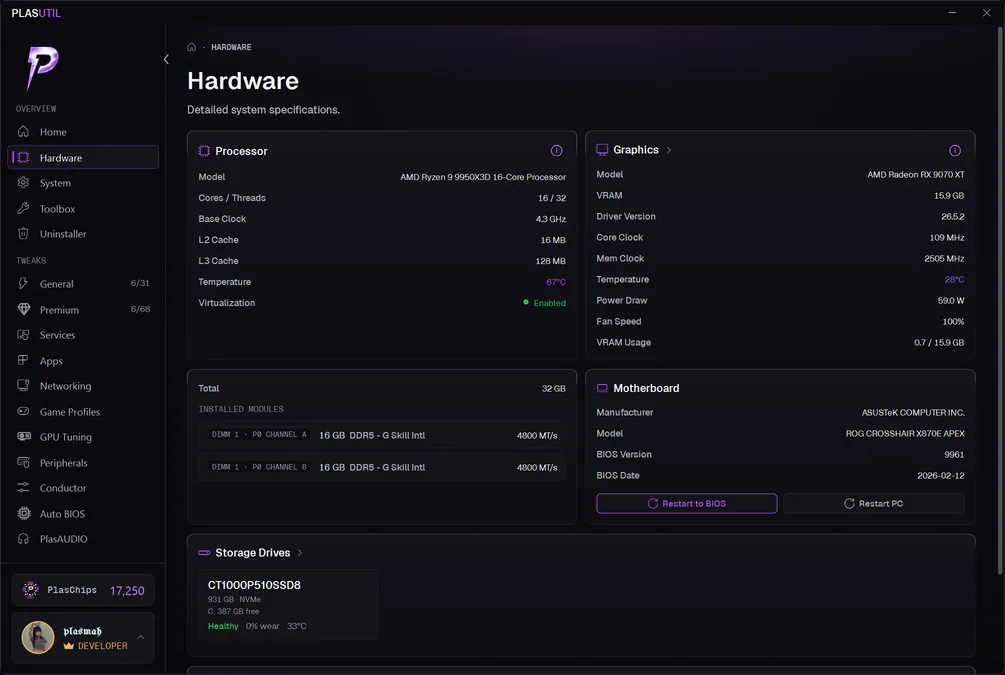
Screenshot 1 of 11: PLAS Util home dashboard with live CPU, GPU, RAM and storage readings and PLAS Game Mode
Games we tune for













System tweaks
Registry, services and startup, sorted into tweaks you can read before you apply and undo on a single click.
Live metrics
CPU, RAM, GPU and disk, sampled while you tune, so you can see what a change did instead of taking a forum post's word for it.
Manual control
GPU clocks, power limit, voltage and fans on NVIDIA and AMD cards, set from inside the app, with no second tool to install.
Game profiles
Tuned config files for the competitive titles it supports, CS2, Valorant, Fortnite, Apex and Marvel Rivals among them. Your own config is copied before the first write, so Revert puts it back exactly.
Undo everything
Revert all puts every setting PLAS Util changed back to the value it had before, and touches nothing you set yourself. A Windows restore point before risky tweaks is one switch away.
App slimming
Cuts the background work Chrome, Edge, Discord and OBS do while you play. Every change is named before it is applied and reverts the same way.
Services presets
Switches off the Windows services a gaming PC never uses, from a preset you pick. One button restores them all.
Network and peripherals
Grade how your connection holds up under load, check the real polling rate of your mouse or controller, and see the hubs and chips your input crosses on the way to the processor.
Uninstaller
Pick the apps you no longer use and remove them in one pass, each through its own uninstaller. It tells you plainly which went and which stayed.
PLAS Conductor
Other tools charge for this. Here it's free on every tier.
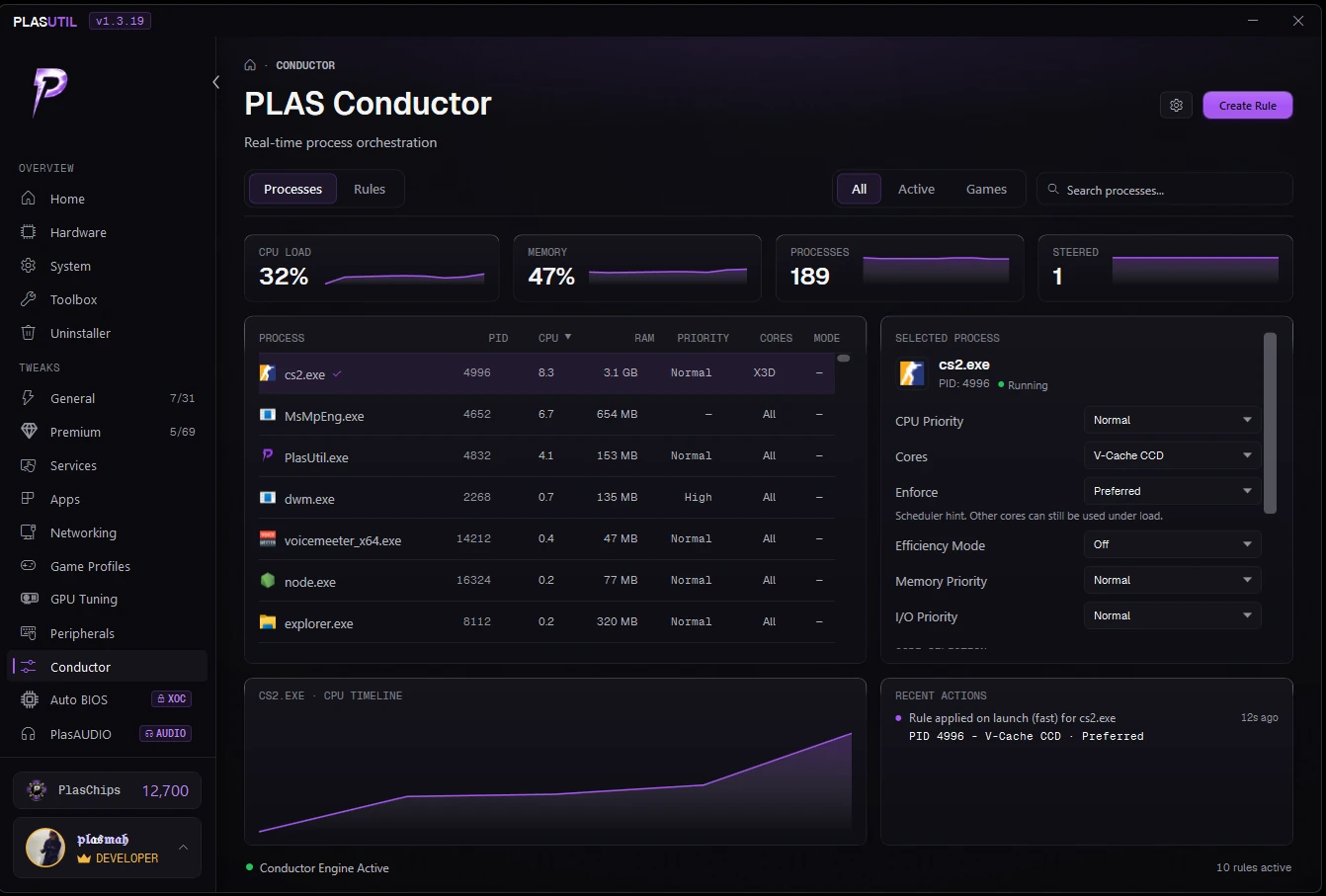
Tell Conductor where a game belongs on your CPU and how important it is, and it puts it there on every launch. Set it once and it keeps working.
Knows your CPU
On a Ryzen X3D it steers your game onto the V-Cache cores. On Intel hybrid chips it keeps games off the efficiency cores. On a two-die Ryzen it stops the game hopping between dies. It only offers what your chip can actually do.
Never interrupts a game
Suggestions queue behind a badge instead of popping over your match. Rules apply on every launch, with PLAS Util minimized or sitting in the tray.
Says when it can't
Some anti-cheat drivers refuse core steering, and Conductor says so plainly instead of showing a setting that never took. When it can reach a game through its launcher, it steers the launcher so the game starts on the right cores.
Measured
The same machine, one hour apart.
One rig, before and after. We publish the lows next to the averages because the low is the frame you actually feel, and it is the one that moved most.
Marvel Rivals
PLAS Util and a BIOS tune
+153%
Average FPS
Frame times came down from 6 ms to 2 ms across the same three test segments.
Fortnite
PLAS Util and a BIOS tune
+53%
Average FPS
The floor more than doubled, so the drops during a build fight stopped landing anywhere near the old low.
Black Ops 7
PLAS Util and a BIOS tune
+23%
Average FPS
The 5% low moved with it, 223 to 343, so the whole frame time spread tightened rather than the peaks alone.
Ryzen 9 9950X3D, RTX 5090, 32GB DDR5, 2560x1440, Windows 11 24H2. Each pair above is stock BIOS with no PLAS Util against a full tune, captured an hour apart at the same settings and the same resolution. The pairs were not all captured on the same day. The Counter-Strike 2 result in the Conductor section is PLAS Conductor on its own, with no BIOS changes.
Every figure was read off the game’s own benchmark or performance report. Nothing is scaled, averaged across runs or projected. Your machine is not this machine: a tighter system has less to gain and a cluttered one has more.
The low is whatever each game reports rather than a figure we chose: a 1% low in Marvel Rivals and Black Ops 7, a session low in Fortnite, a P1 low in Counter-Strike 2. We publish each one under its own name instead of relabeling them all to match.
Pricing
Free covers the basics. Paid goes deeper.
Free
A full app, not a trial
Forever free
- Everyday system tweaks, all reversible
- Live CPU, RAM, GPU and disk metrics
- Game profiles and PLAS Conductor included
- Automatic updates, same as paid
- The advanced tweaks (not included in this tier)
PLAS Util is a Windows app. Open the link on your PC to download it.
Tweaker
For people who tune
Cancel anytime
- Everything in Free
- Advanced tweaks included
- A deeper services preset
- Slimming for more browsers, launchers and Spotify
- Cloud backup to restore your setup on any PC
- One-click GPU auto overclock
- Support that jumps the queue
- XOC tools and auto BIOS tuning (not included in this tier)
XOC
The last few percent
Cancel anytime
- Everything in Tweaker
- CPU-specific tuning
- Auto BIOS tuning, no digging through menus
- PLAS Game Mode and the XOC network tune
- The XOC services preset and the PLAS timer preset
- First access to anything in beta
PlasAUDIO
Works on any tier
- Permanent PlasAUDIO licence
- Virtual surround positioning for footstep clarity
- Set up in one click
Rather have it done for you? I can tune your PC live over AnyDesk. See the sessions
Feature comparison
| Feature | Free | Tweaker | XOC | PlasAUDIO |
|---|---|---|---|---|
| Basic system tweaks | ||||
| PLAS Conductor process steering | ||||
| Automatic updates | ||||
| Advanced tweaks | ||||
| More apps and launchers slimmed | ||||
| Tweaker services preset | ||||
| Cloud backup | ||||
| GPU auto overclock | ||||
| Priority support | ||||
| XOC exclusive tools | ||||
| Auto BIOS tuning | ||||
| XOC services and timer presets | ||||
| Permanent audio licence |
FAQ
Frequently asked questions
What's the difference between Free and Tweaker?
Free covers the everyday tweaks, live metrics, game profiles and PLAS Conductor, with no time limit. Tweaker unlocks the advanced tweaks, a deeper services preset, slimming for more apps and launchers, cloud backup of your setup, one-click GPU auto overclock for GeForce and Radeon RX 7000 and 9000 desktop cards, and support that jumps the queue. The comparison table above has the full split.
Do I need an account?
You sign in with Discord, Free tier included. Your Discord account is your PLAS account: there is no separate password and no key to keep, and your tier is attached to it.
Is it safe with anti-cheat?
PLAS Util changes Windows, driver, BIOS and game config settings. It never injects into a game or reads its memory, and Conductor leaves anti-cheat processes alone. Every change can be reverted.
Can I cancel my subscription anytime?
Yes. There is nothing to commit to beyond the period you paid for, whether that is a month, six months or a year. Cancel from your account whenever you like and you keep access until that period runs out.
Is my payment information secure?
Payments run through Stripe, which is PCI-DSS Level 1 compliant. Your card details go straight to them and never touch our servers.
What does "XOC exclusive tools" include?
The heavy end: CPU-specific tuning, auto BIOS tuning, PLAS Game Mode, the XOC network tune, the XOC services preset, the PLAS timer preset, and first access to anything still in beta. Tweaker gives you the core of the app; XOC is for people chasing the last few percent.
How does the Lifetime 10% off work?
It covers everything else PLAS sells, never Lifetime itself. Sessions get it at checkout when you book signed in, prebuilt PCs on the quote; the PLAS PAD takes it off at checkout once pre-orders open.
Do I get updates with my subscription?
Everyone gets updates, free users included. The app checks for a new build each time it starts and installs it in one click. Updates are not something we hold behind a tier.
What if I have a problem or need support?
Free users can reach us on Discord. Tweaker and XOC get priority, which in practice means we answer you first. Either way, mail support@plasxoc.com and we will sort it out.
What's your refund policy?
Cancel anytime. It stops all future charges, and you keep access until the end of the period you have paid for. We do not pro-rata refund part-periods for a change of mind, but if you have been charged in error we will refund it in full, and your rights under the Australian Consumer Law always apply. Something not working? Reach out to support@plasxoc.com and we will fix it. See our Terms for the full policy.
Your PC has more in it than you are getting.
The free tier is a full app, not a trial. Install it, watch the metrics move, and decide from there whether you want the advanced tweaks.
PLAS Util is a Windows app. Open the link on your PC to download it.
Free to start · Sign in with Discord · Self-updating · Windows 10 & 11